Punch cards and treatment packages
A punch card that fills from completed visits — each punch after your approval, with a reward at the end — and a prepaid treatment package that goes down with each visit. On Pro.
There are two kinds. A punch card — say, every 10 manicures, one free — that each completed visit punches, with a reward waiting once it’s full. A package — say, 6 treatments paid in advance — opened for a specific client, with each visit for that service taken off it.
Creating a punch card
Open the screen
ManagePunch cards & packagesTap “New punch card” or the +. You can start from a ready idea.
Fill in the name and reward, pick how many visits fill a card and which services count, and tap “Save”.
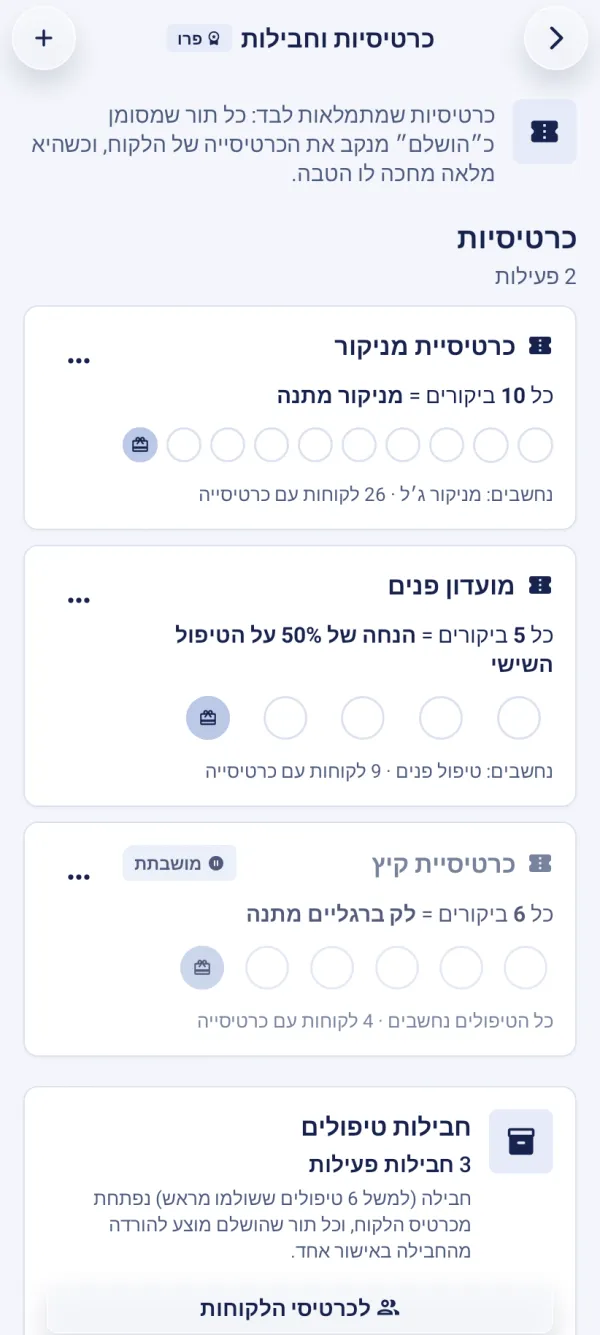
Punching with approval
A completed visit isn’t counted by itself — it waits for your approval, so a no-show or someone else’s visit isn’t counted.
On the phone, in the “Overview” tab, there’s the “Punch confirmations” card: “Punch” (or “Use a session” for a package), and “Not now” skips.
On the client card you can also punch by hand, undo a punch, and redeem the reward when the card is full. The reward is kept on the card and can be redeemed at the next visit too.
A treatment package
On the client card, under “Loyalty: punch cards & packages”, tap “New treatment package”.
Fill in the details and tap “Save”.
Each package shows how many sessions were used and how many are left. “Use a session” takes one off by hand, “Undo use” puts it back, and “Cancel package” stops it — any refund that’s due is done separately.
A paused punch card doesn’t punch new visits, and anyone who already collected punches keeps them. Changing the number of visits applies to the next punches.
The guided tour is in the app
In the “Punch cards & packages” chapter, the tour shows this on the screen itself, step by step.
Is every visit counted automatically?
No — each completed visit waits for approval, and only then counts on the card or package.
Who manages punch cards and packages?
The owner and managers create and edit punch cards, and only they cancel a package. Anyone on the team can confirm a punch in the app’s “Punch confirmations” card — a staff member sees their own visits there — and, on the client card, punch, redeem a reward, open a package and use a session from it. On a computer, “Visits to approve” is on the “Punch cards & packages” page, which is open to the owner and managers.
Updated: 10 October 2026
Related guides
- The client card: history, notes and photosEverything about a client in one place: appointments and visits, revenue and no-shows, private notes, before-and-after photos, forms and punch cards — and search, sorting, tags.
- Forms and health declarations with a digital signatureProHealth declarations, consent forms and questionnaires — sent on WhatsApp with the appointment or signed in person on a phone or tablet; the signed copy stays on file. On Pro.
Did this guide help?
Still have a question? Write to us