Forms and health declarations with a digital signature
Health declarations, consent forms and questionnaires — sent on WhatsApp with the appointment or signed in person on a phone or tablet; the signed copy stays on file. On Pro.
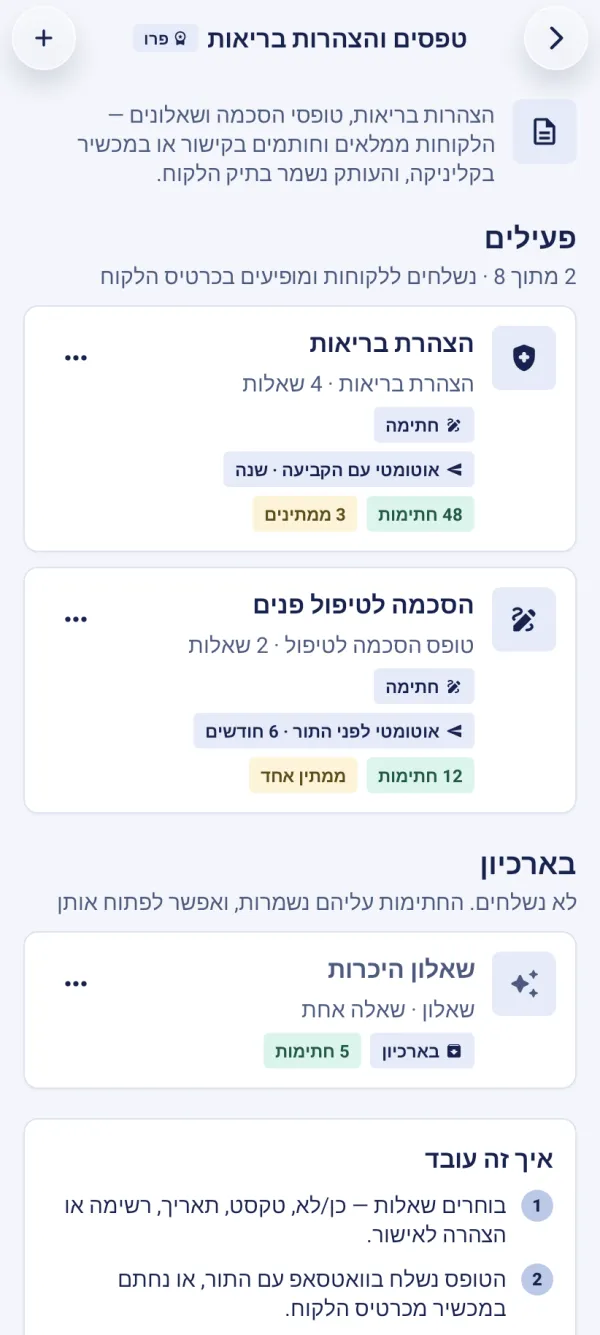
Clients fill in and sign through a link on their own phone, or in person on your device. The signed form is locked and kept in the client’s file, with a running serial number, the exact date and time, and a digital stamp — and it can’t be changed.
Creating a form
Open the screen
ManageForms & declarationsTap “Start from the health declaration”, pick another ready-made form, or “Blank form”.
Fill in a name and intro, and add questions with “Add a question”. A long press on a question moves, duplicates or deletes it.
Turn on “Digital signature” and “Send automatically before a treatment” as needed, and tap “Save”.
When the form goes out
For automatic sending, choose “On booking” — as soon as the appointment is booked and approved — or before the appointment, on WhatsApp, as many hours ahead as you pick. The message before the appointment doubles as a reminder, with arrival-confirmation buttons. The form goes only to clients who haven’t signed it within its validity, and once that runs out it goes out again with the next appointment.
Signing in person, or sending by hand
On the client card, under “Forms & health declarations”, choose to sign on the spot (on this device) — and hand the phone or tablet to the client.
Or send it to the client on WhatsApp.
At the clinic, signing on a tablet or iPad is easiest: open the client card — in the app or on the website — and choose to sign in person.
For each form, “Signatures” shows who signed and when, and who hasn’t yet — with resending on WhatsApp, copying the link, or cancelling the request.
On the Pro plan you can keep up to 30 active forms. Move a form you don’t use to the archive: it isn’t sent, and its signatures are kept.
The guided tour is in the app
In the “Forms & health declarations” chapter, the tour shows this on the screen itself, step by step.
Can I change a form that’s already been signed?
No — the signed copy is locked. Edit the form itself, and the change applies to new signatures.
A form is marked as over the limit — what do I do?
An active form over the limit isn’t sent until you move another form to the archive.
Updated: 10 October 2026
Related guides
- The client card: history, notes and photosEverything about a client in one place: appointments and visits, revenue and no-shows, private notes, before-and-after photos, forms and punch cards — and search, sorting, tags.
- Punch cards and treatment packagesProA punch card that fills from completed visits — each punch after your approval, with a reward at the end — and a prepaid treatment package that goes down with each visit. On Pro.
Did this guide help?
Still have a question? Write to us